
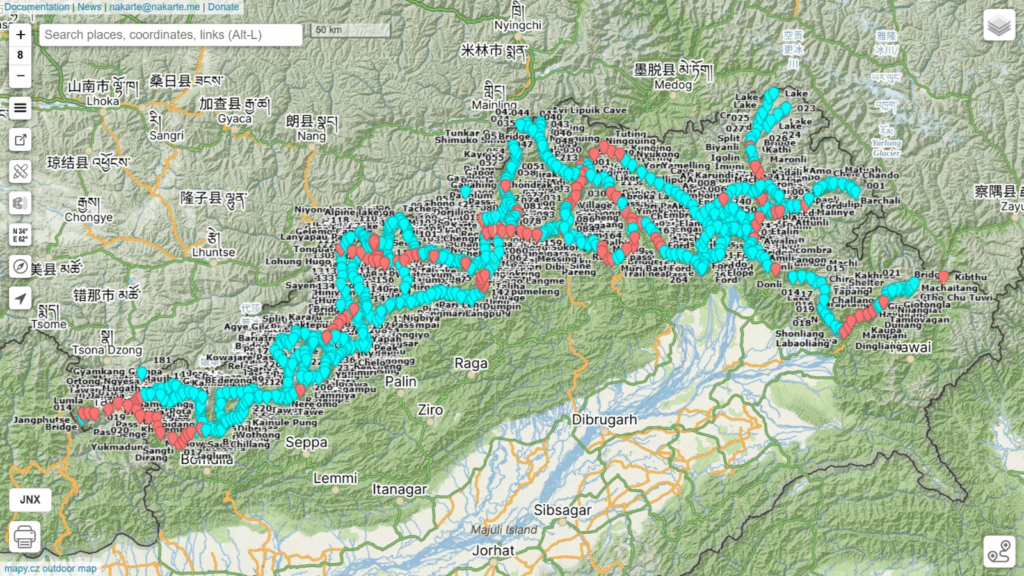
On request of Col. Anand S. we planned a traverse across the Eastern Indian Himalayas in Arunachal. As no trails are present in OSM we used 1:25K and 1:50K Survey topo sheets to map a continuous 1000km mid-altitude traverse across 18 passes and 19 valleys from the border of Tibet in the East to the border of Bhutan in the West. Survey maps are not published for the border areas so the traverse avoids the immediate border regions.
- Map Layers
- Map Features
- Planning a Traverse
- Food Supply
- Trans Arunachal
- Duration
- Night halts
- Field Navigation
- Geography
Map Layers
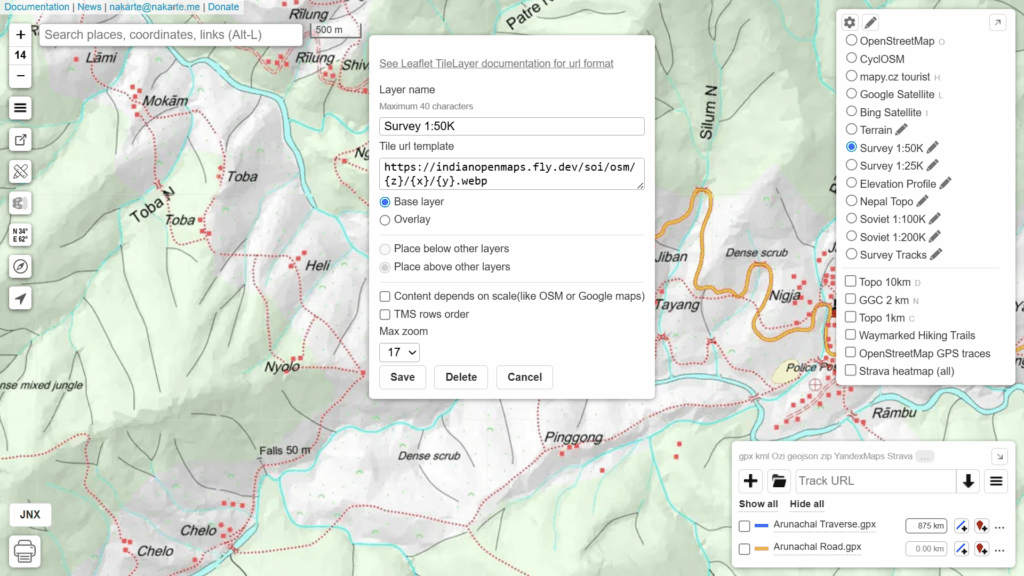
The traverse was planned using nakarte.me, a simple web based planning tool. Add below customs layers to Nakarte to add Survey map layers:
- Survey 1:50K: https://indianopenmaps.fly.dev/soi/osm/{z}/{x}/{y}.webp
- Survey 1:25K: https://indianopenmaps.fly.dev/soi/25k/nhp/{z}/{x}/{y}.webp

Map Features
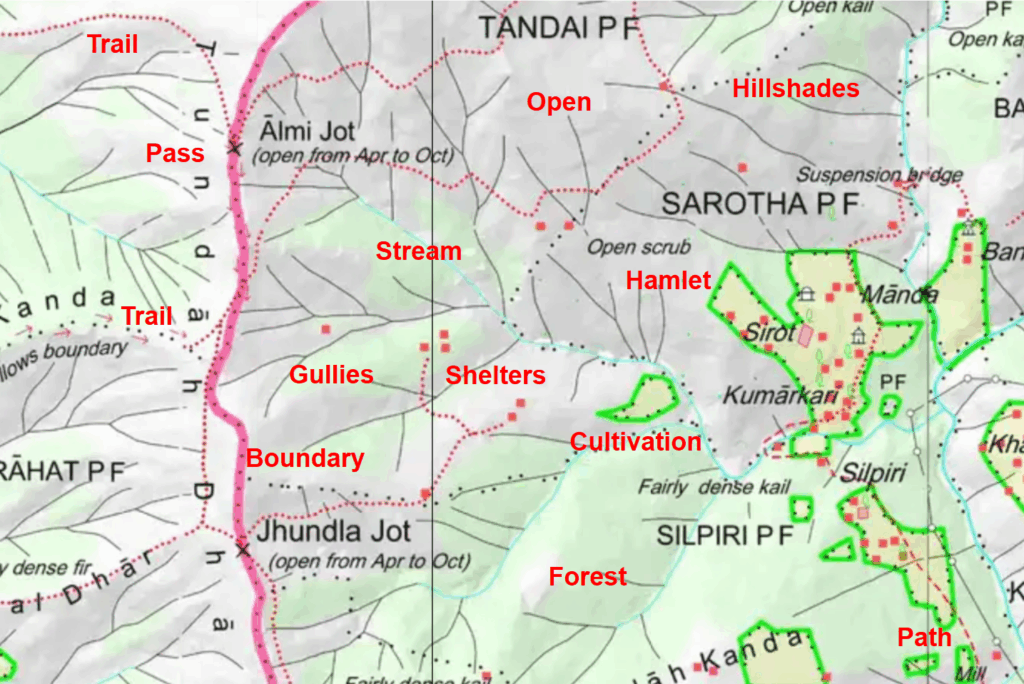
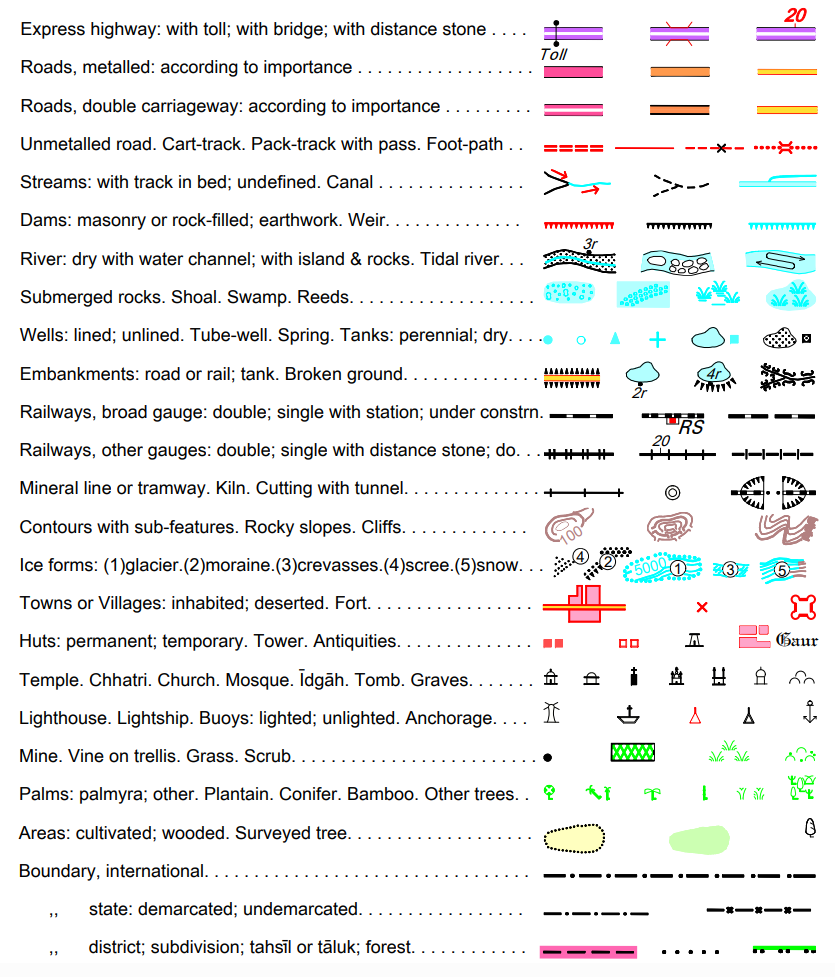
Follow Survey map features can be used to plan a traverse:
- Trails (red dotted lines) – narrow, steeper
- Paths (red dashed lines) – wider, gradual
- Trails (red arrows) – trails following ridges, streams
- Cart track (red line)
- Dirt tracks (double dashed lines) – jeep tracks
- Mountain pass (black cross) – high point along a trail
- Bridges (two parallel lines) – trails across rivers
- Roads (orange or yellow wide lines) – to connect trails
- Villages (red squares), Dwellings (white squares) for night halt, food supply, charging electronics
Planning a Traverse
To plan a traverse in nakarte you can put periodic (every few kms) markers along the above features marking a continuous long-distance path through the mountains. Survey maps are fixed scale 1:50K, 1:25K so you ll have to:
- Zoom in in order to spot the trails
- Zoom out and pan to get a longer-distance overview to see where a trail leads to
- Some trails might go off the map (cross border)
- Some trails might lead to a deadends
- The challenge is to identify the closest trail to the border (highest altitude) that continues uninterrupted
- Look for parallel alternate routes as backup in case a primary trail is no longer in use
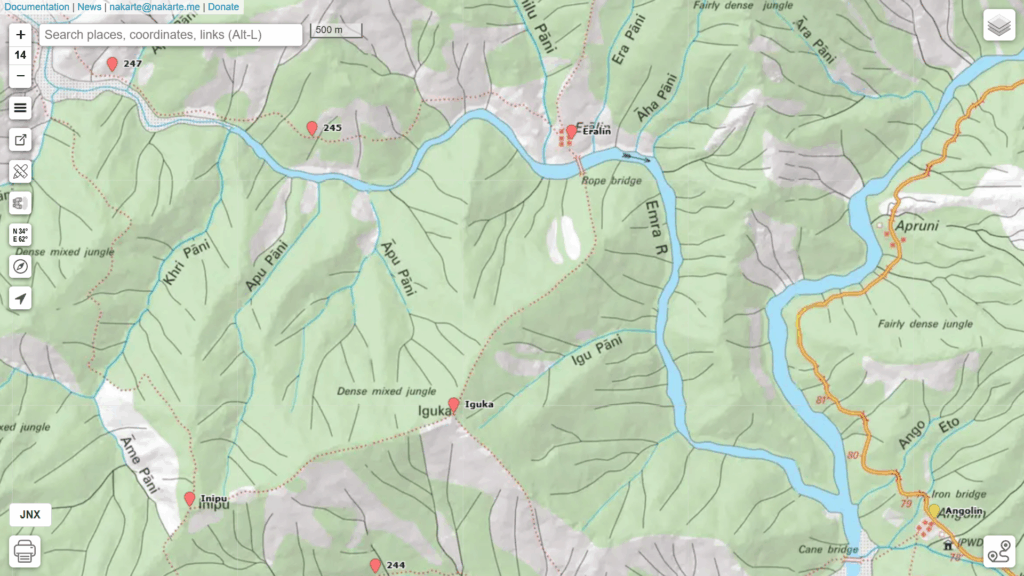
Along the way ensure to mark important points you cross:
- Villages – food supply, night halt, charge electronics
- Mountain passes
- Mountain peaks
- Road connections – can be used as food drops (army style supply)
- Streams, springs – water supply
- Fords, bridges – where to cross stream
Food Supply
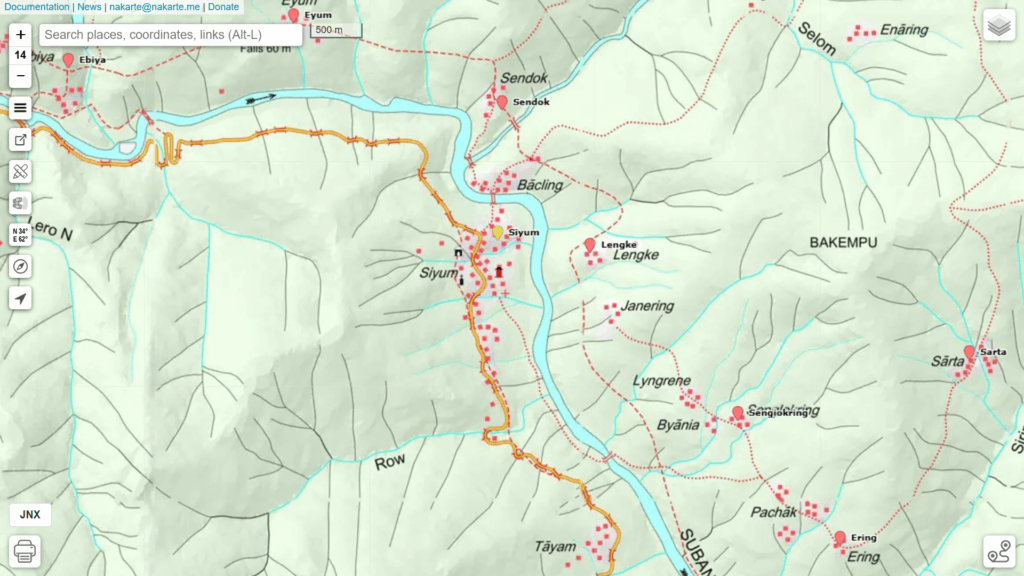
As an independent light weight hiker I avoid carrying large rations of food and instead resupply food in in-between villages. Going light in steep terrain has significant benefits. Anand was insisting that this is not accepted by the army which instead opts for in-between food drops using roads or porters. Keeping that in mind I marked road-connected sections of the traverse in a different color.
Trans Arunachal
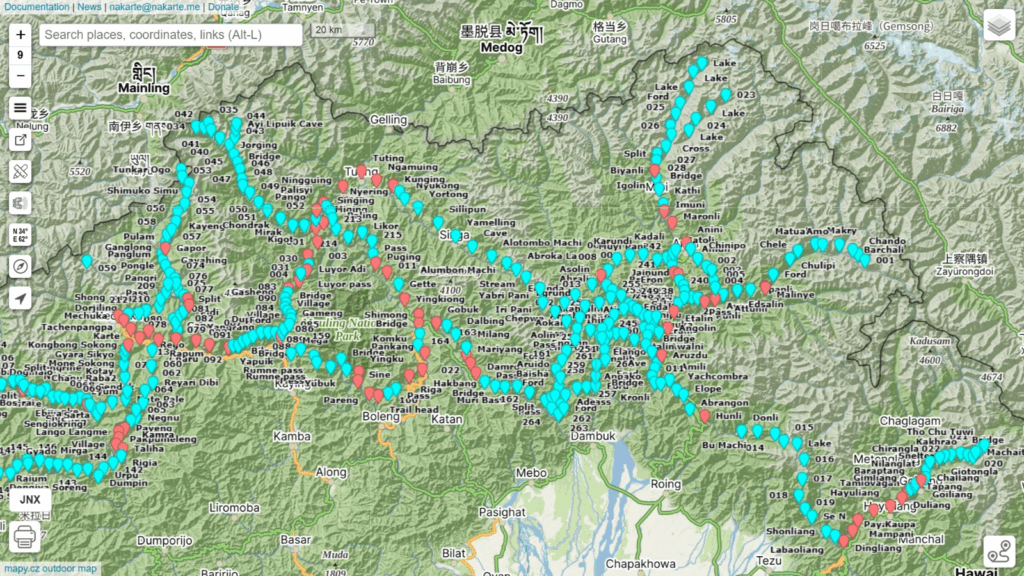
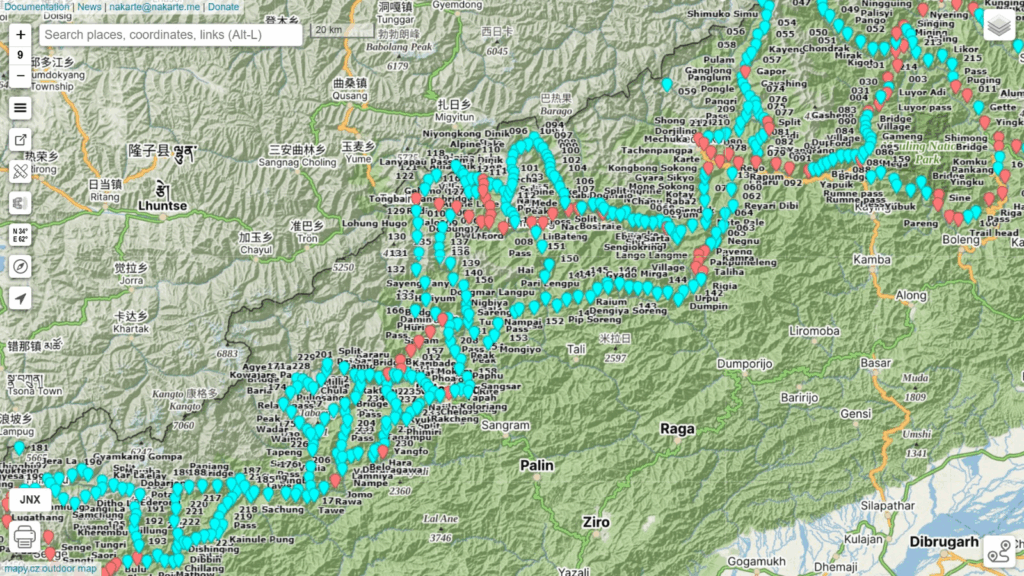
After analyzing (read: zooming and panning around the border) Survey maps for hours I was able to identify a continuous high-altitude route along the border from East to West across Arunachal. I traced multiple alternative routes in case some primary route is no longer in use. Two markers are used – download and load the GPX files in nakarte.me to view the traverse:
- Traverse points (blue) – periodic trail markers, villages, passes, peaks, stream crossings
- Road points (red) – road connected villages (potential food drop points)
Duration
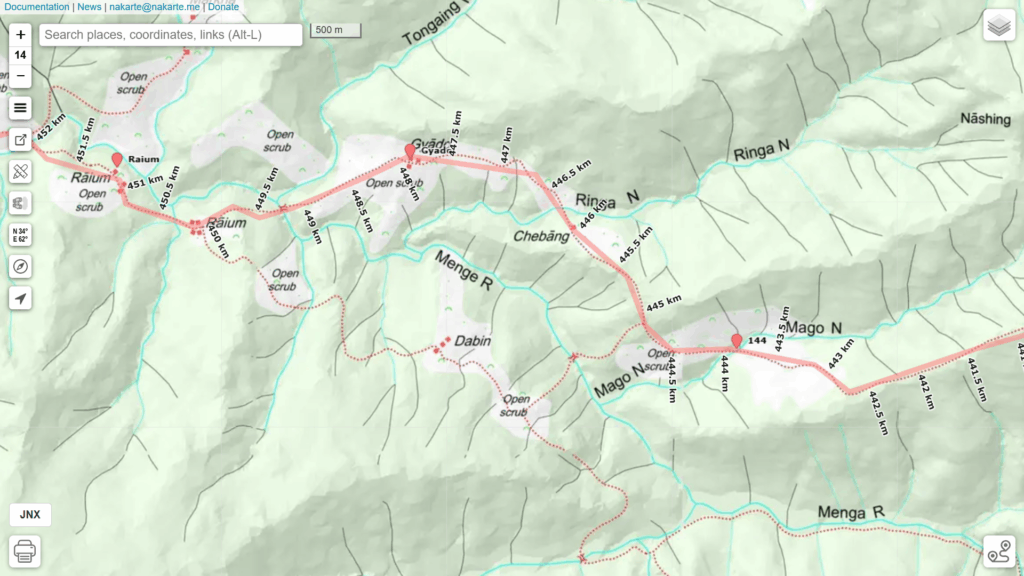
To estimate the overall duration of any given traverse we need to estimate the total distance. To do so we can trace an approximate track along the planned Survey trail. Tracing a trail accurately is time consuming, instead we can approximate the map trail drawing segments say every (few) km(s) and add 10-20% extra to compensate for the missed curves.
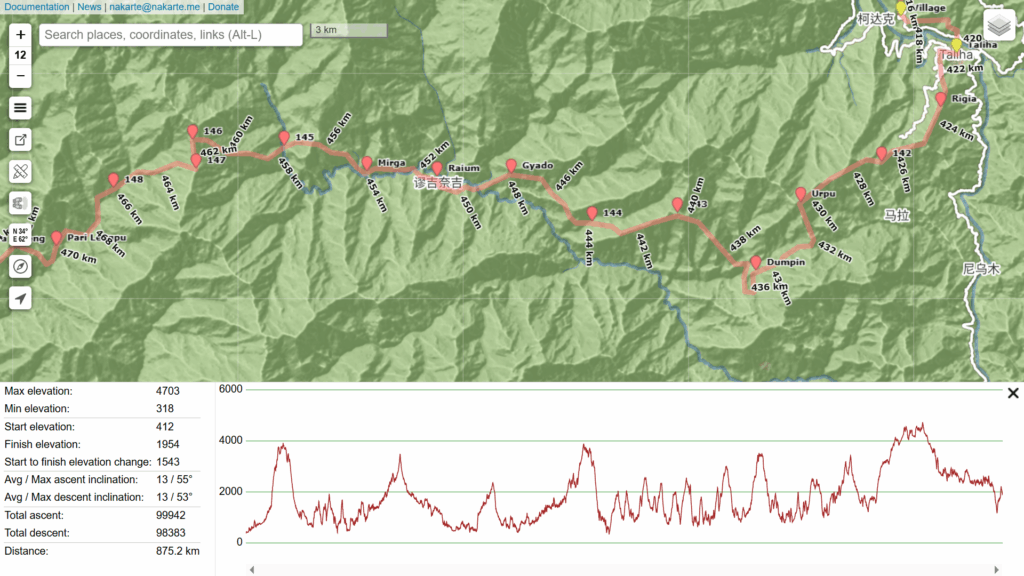
Once we trace the entire traverse nakarte can show an Elevation Profile with overall metrics including distance and elevation gain showing the major passes and in-between valleys of this sub-4000m traverse. This particular traverse amounts to 875km which – being approximated – would probably be around 1000km in length. With an estimated mileage of 20km per day this would result in approximate duration of 50 days to cross the entire length of Arunachal.
Planning for a food resupply every week to limit the weight on our shoulders we could plan for around 9 equidistant food drop points:
- Dingliang, 27.97970 96.39576
- Aruzdu, 28.49080 95.82790
- Tuting, 28.99485 94.89201
- Yangrang, 28.53100 94.37595
- Taliha, 28.23346 94.14727
- Koloriang, 27.90192 93.35228
- Jomo, 27.65809 92.99987
- Tungri, 27.44464 92.38069
- Tawang, 27.58827 91.86438
Night halts
Planning your daily night halts in advance could be done using the km markers shown by nakarte along the traverse (say every 20km). From experience though the actual timeline is usually different from the planned timeline due to unexpected challenges and unpredictable pace. Therefore I suggest to start looking for a suitable place to halt for the night 1-2 hours before sunset each day. Potential candiates are:
- Villages
- Natural shelters (shepherd rock shelters, boulders, caves)
- Campsites (flat space near running water)
Field Navigation
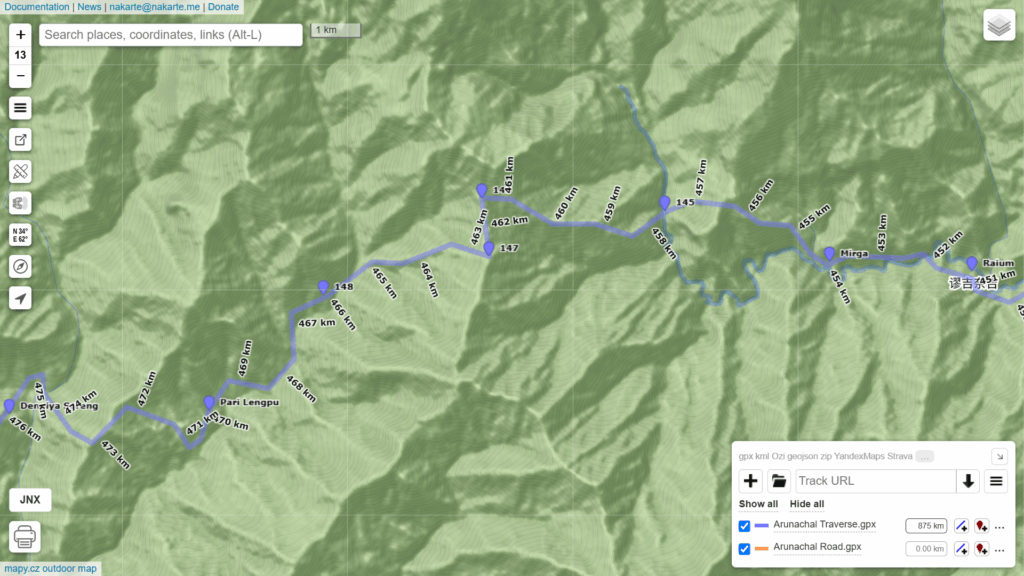
Once you finalize your planned traverse (and alternate/backup routes) you are almost ready to head out into the mountains. The marked traverse (read: hundreds of waypoints every few kms) fixes the overall route and direction. For precise day-to-day navigation however we need the exact Survey trail location. We can either:
- Accurately trace / digitize the Survey trail and download in your phone as GPX file
- Geo-reference the entire Survey map and download in your phone as a SQLitedb offline map
The first method (digitizing the trail) is preferred for smaller traverses as it can be time consuming for long distance traverses. The second method (carrying offline map) is preferred for longer traverses and having multiple alternate routes in hand in case you get stuck due to weather conditions or no longer used routes.
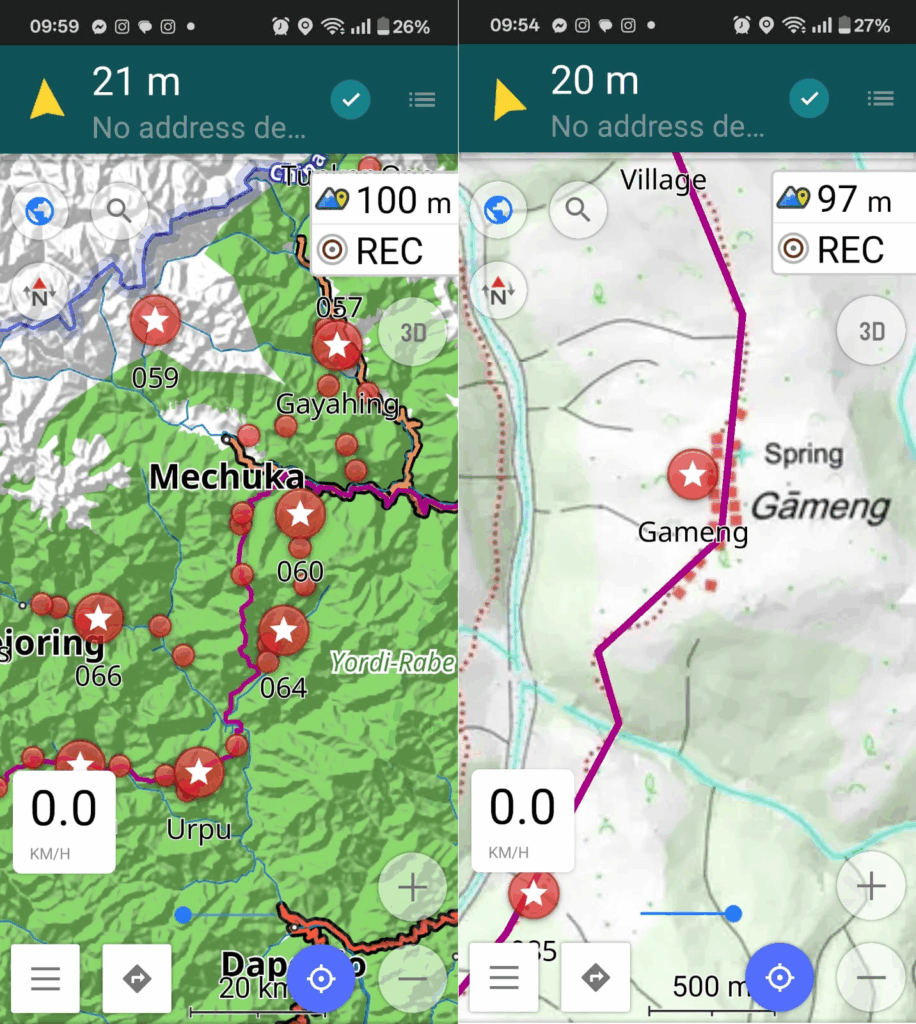
Digitizing a trail can be done directly in nakarte and export as a GPX file. Geo-referencing Survey maps and exporting as SQLitedb offline map can be done using QGIS:
- Add XYZ map layer in QGIS (use Survey 1:50K or 1:25K webp URL)
- Generate XYZ tiles (QGIS processing tool box) to export a given region as MBTiles file
- Use Python to convert the MBTiles to SQLitedb format (chapter 6.6 of online bootcamp)
Geography
Before you head out or even plan a traverse in a given region it’s good to have a good understanding of the overall topography or geography of the same:
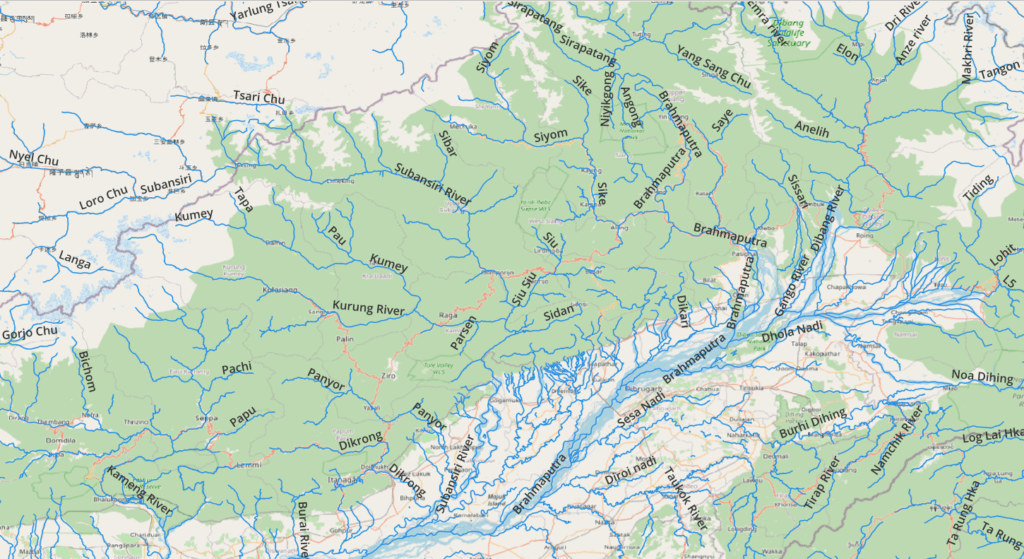
- Major rivers flowing through the region
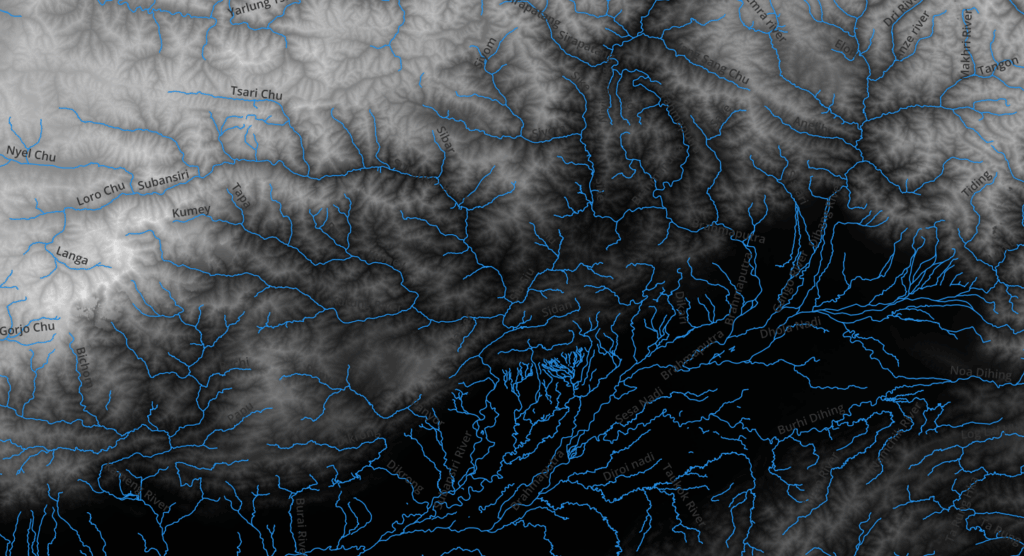
- Elevation range of the region
Major rivers of a given region can be downloaded from OSM using the QGIS QuickOSM plug-in (waterway=river):
To understand the elevation range of a region we can download DEM (Digital Elevation Model) data through the QGIS SRTM-Downloader plug-in: (lower areas are shown in dark, higher areas in lighter shades)
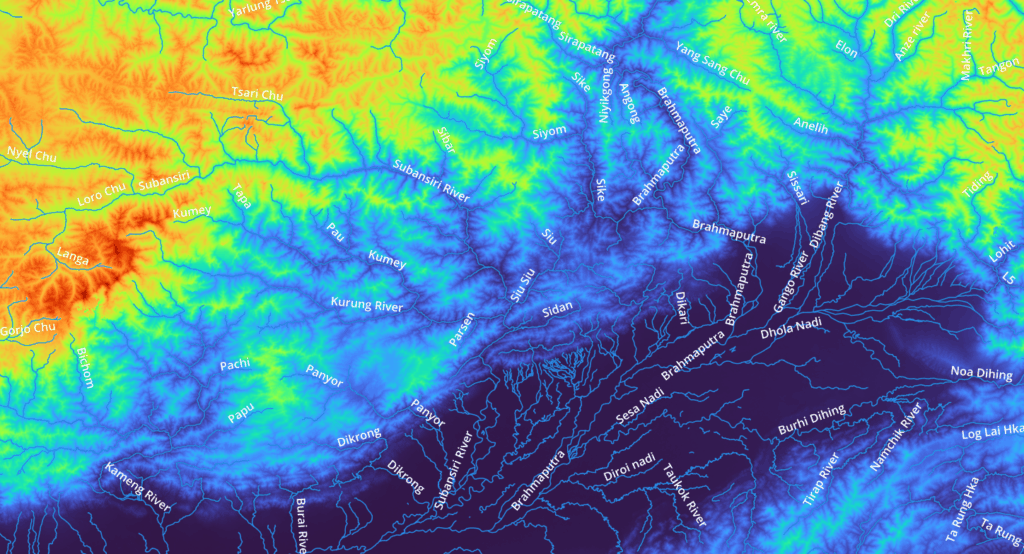
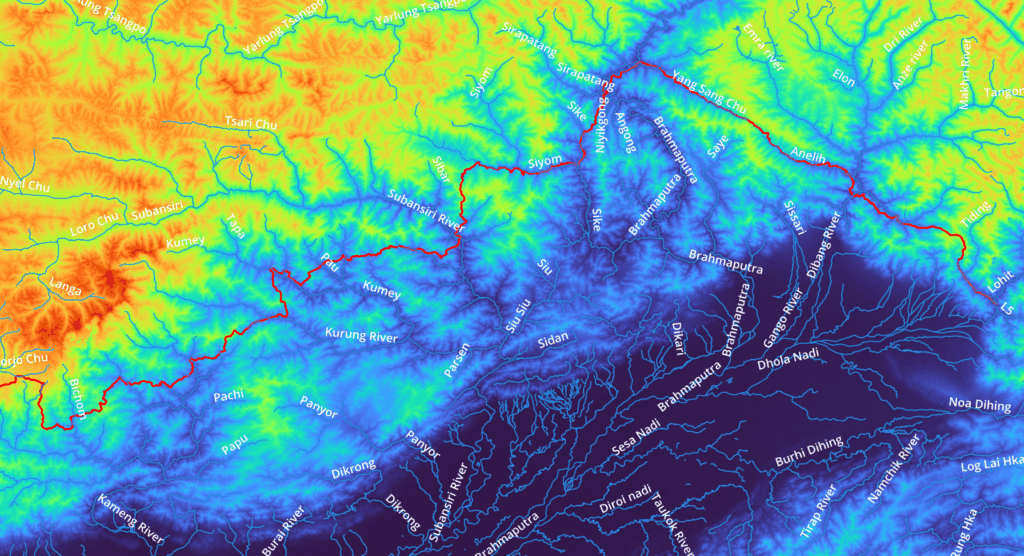
We can visualize this elevation data in a more comprehensive way through a Singleband Pseudocolor Spectrum clearly showing higher areas in (orange, red) and lower areas (green, blue). Snow and glacial melt from higher ranges are drained by the major rivers shown:
Finally we can overlay our planned traverse to get a better understanding of the major valleys and in-between high ranges we traverse through:
You can zoom into smaller sub-sections of the 1000km long trans Arunachal traverse to clearly see the individual valleys (19 rivers, usually inhabited) and ridges (18 mountain passes) we traverse through:
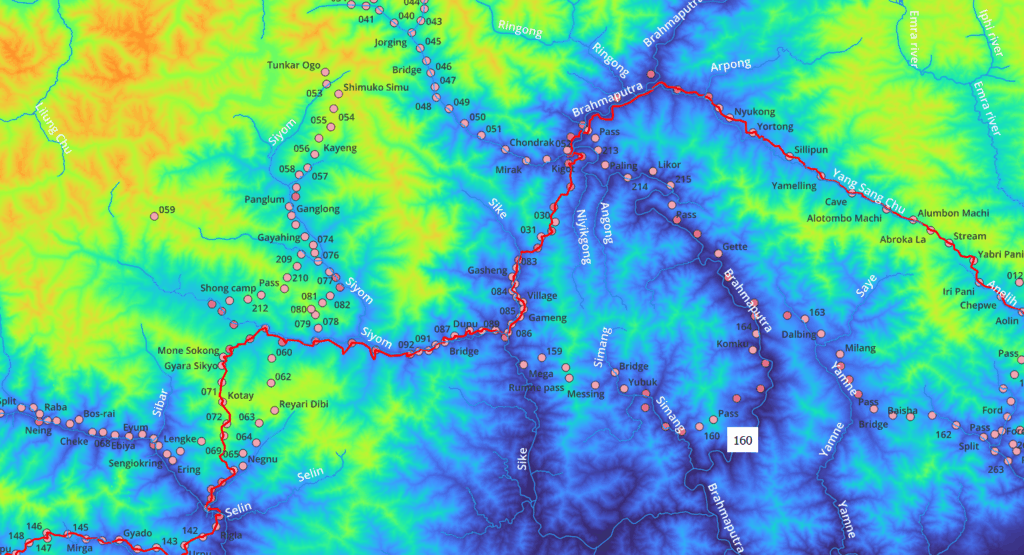
- Zayul River
- Da Chu
- Pass
- Dav River
- Lohit
- Tiding
- Pass
- Dibang River
- Anelih
- Abroka La pass
- Brahmaputra
- Pass
- Sike
- Siyom
- Pass
- Subansiri River
- Urpu pass
- Unnamed river
- Pass
- Unnamed river
- Hama
- Pass
- Pau
- Pass
- Kumey river
- Pass
- Kurung river
- Pass
- Unnamed river
- Pass
- Unamed river
- Pass
- Unamed river
- Pass
- Unamed river
- Pass
- Bichom
- Pass
- Sangti Chu
- Pass
- Gorjo Chu
- Ditho La pass
- Mago Chu
- Tawang Chu
- Nyamjang Chu
Hi Peter, thanks for putting this together & I am finding this very informative & useful. If you could help me access the below links, which can’t be reached by me
“Survey 1:50K: https://indianopenmaps.fly.dev/soi/osm/{z}/{x}/{y}.webp”
“Survey 1:25K: https://indianopenmaps.fly.dev/soi/25k/nhp/{z}/{x}/{y}.webp”
Would like to upload as a base layer at nakarte.me along with other survey maps from other regions like Sahyadri & etc. Waiting for the approval from SOI on my registration. I believe they don’t allow us to download these maps without their prior approval anymore